Chrome Extension (Manifest V3) · 100% Local-First SOP & Walkthrough Video Recorder

Record the workflow once.
Get the guide, screenshots and video.

Start Reconce, complete the task in your browser, and stop. Reconce captures the important actions and turns them into an editable step-by-step guide with screenshots and a walkthrough video.

Local-first by design • Built for QA, customer support, onboarding and operations

Manifest V3 Architecture
0 Cloud Uploads
DOM Semantic Capture
100% Offline Processing
Local .sopx Project Files

Stop recreating the same process after you've already done it.

Most process documentation forces teams into a 4-pass manual grind: performing the task, capturing screenshots, typing every step by hand, and re-recording for video. Reconce captures every output in one pass.

The Manual Way

The 4-pass documentation grind

Writing SOPs after the fact is slow, incomplete, and outdated the moment the UI changes.

  • ✕ Do the task while constantly hitting screenshot shortcuts
  • ✕ Open an image editor to crop frames and manually blur credentials
  • ✕ Type 15 individual steps into Notion, Google Docs, or Jira
  • ✕ Record a separate screen capture video for people who want to watch
Takes 35–45 minutes per workflow. Documentation gets avoided.
The Reconce Way

One browser session. All outputs created.

Perform the task naturally. Reconce records semantic labels, coordinates, and screen states automatically.

  • ✓ Click Start Recording on your active tab and complete the task once
  • ✓ Automatic step phrasing from visible DOM labels ("Click Generate Invoice")
  • ✓ Built-in screenshot annotation, target highlight pins, and privacy redaction
  • ✓ Export paginated PDF, standalone HTML, Markdown, and 1080p video together
Takes 2 minutes. What you actually did is what gets documented.

One recording session. Every format your team needs.

No extra tools. No copy-pasting images between applications. Every asset is generated directly from your browser session.

Step-by-step guide

Editable DOM Steps

Browser clicks and form interactions convert into editable, numbered instructions with exact button names and input fields.

Step screenshots

Vector Pins & Crops

Every important action preserves a high-definition screenshot with clear vector target highlights and numbered step callout pins.

Walkthrough video

1080p Smart Zoom

Composes a focused demo video with Screen-Studio shot planning: animated camera zooms, Catmull-Rom smoothed cursor paths, and subtitles.

Redaction & annotation

Permanent Blur

Blur or solid-box sensitive customer emails, API keys, and account balances before sharing. Redactions burn permanently into exports.

Multiple export options

PDF · HTML · Markdown

Produce self-contained vector PDF documents, standalone offline HTML files, Markdown packages, or 1080p video with 1 click.

Reusable project backups

.sopx Local Files

Save .sopx project files on your computer. Reopen previous recordings months later to add steps or update screenshots without starting over.

From browser workflow to shareable guide in four steps.

Designed to stay out of your way while you work, then give you an editor to polish everything before export.

STEP 01

Record

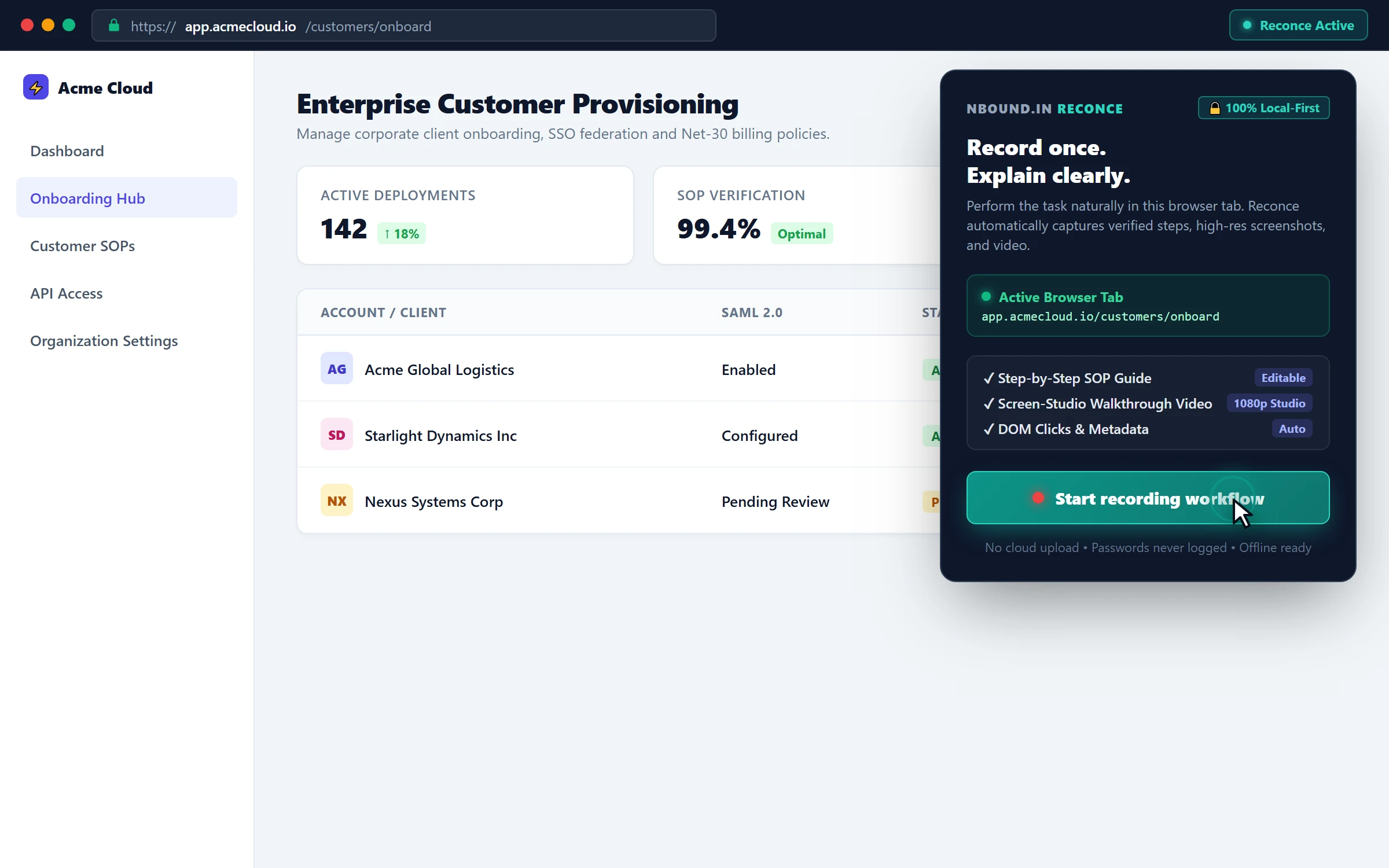
Click the Reconce extension icon on your browser tab and hit Start Recording. Choose to capture guides, video, or both.

Step 1 Start Recording
STEP 02

Perform workflow

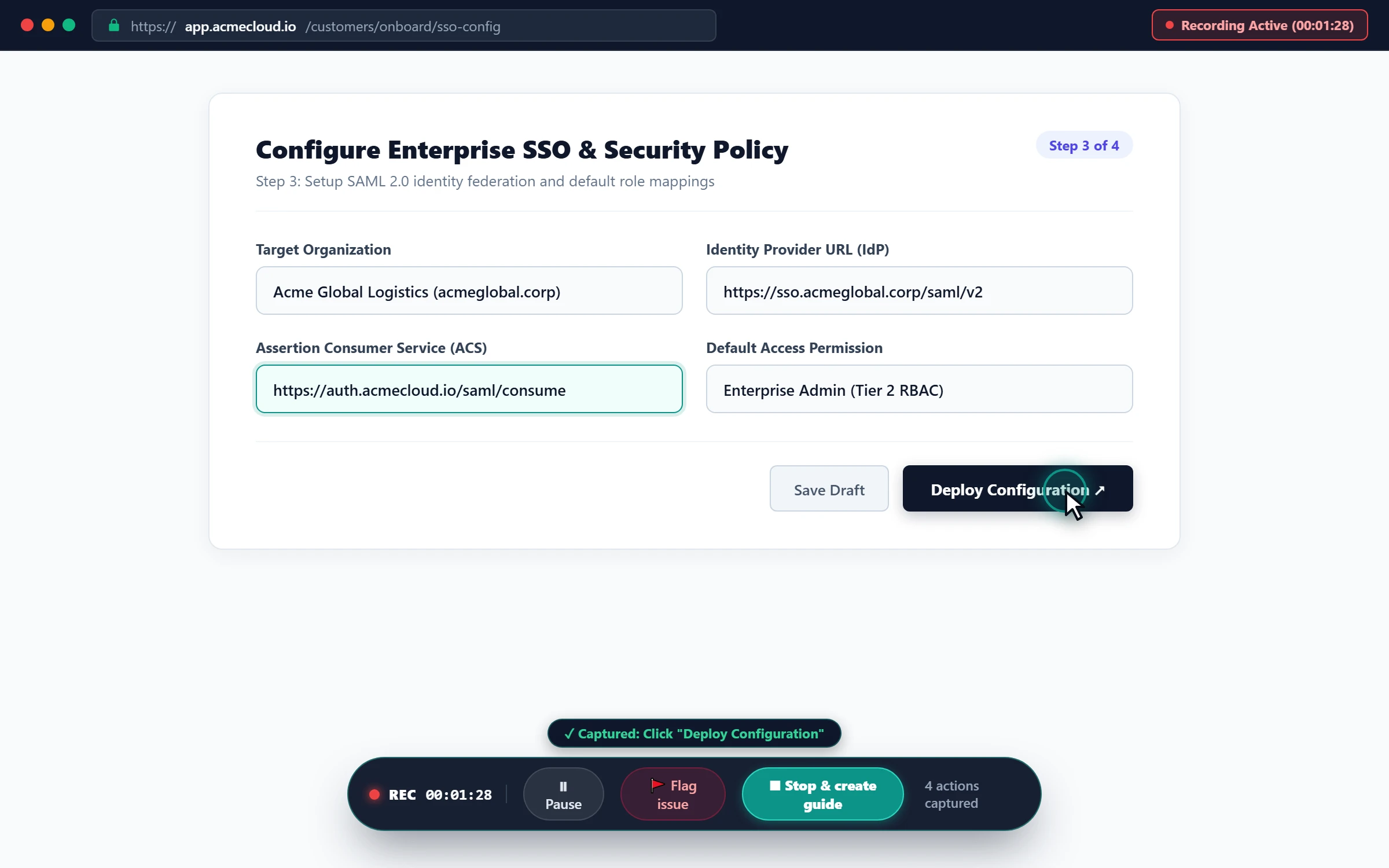
Do the task naturally in your web app. Reconce logs semantic button names, clicks, form inputs, and video in the background.

Step 2 Do the task
STEP 03

Review and polish

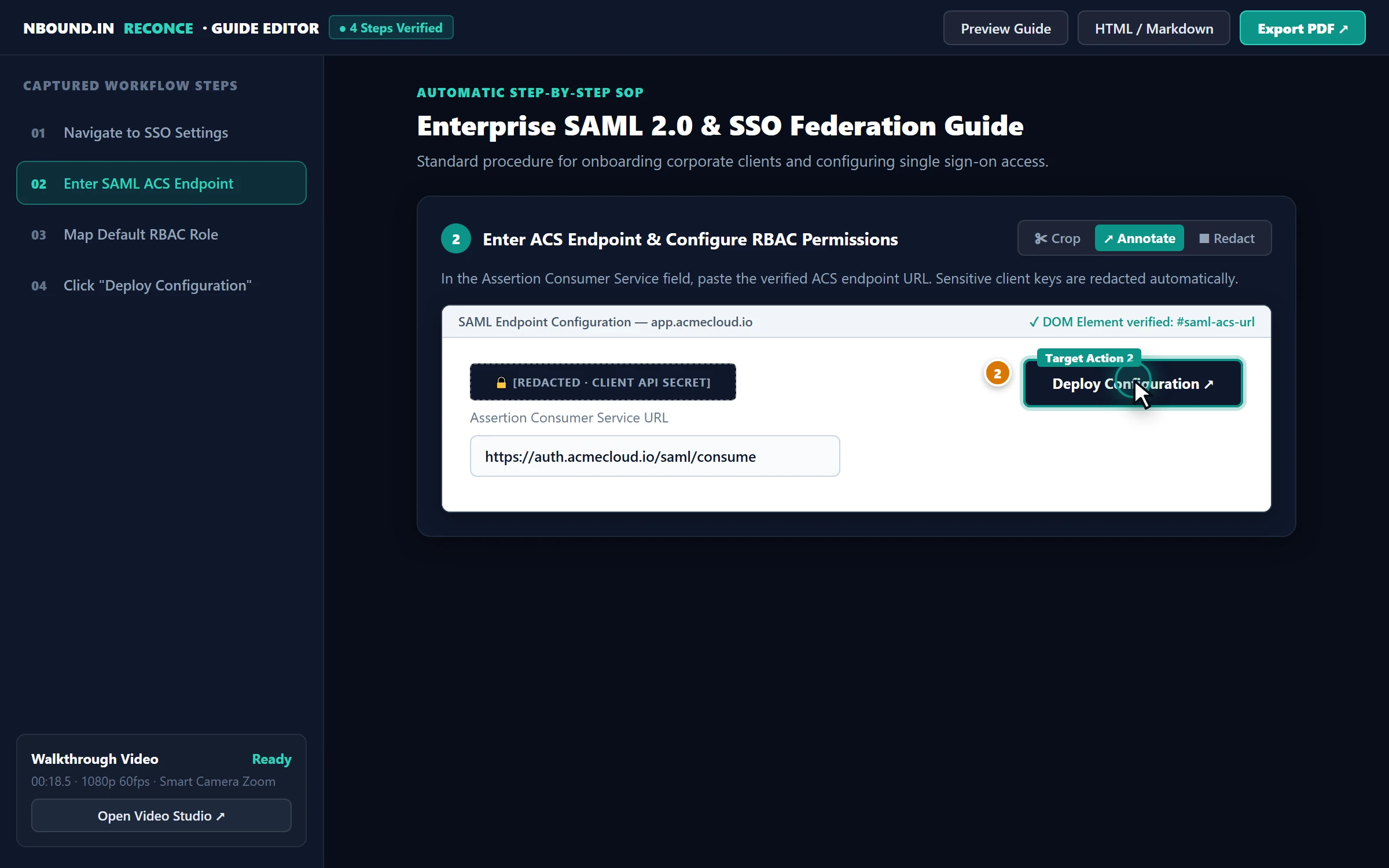
Edit generated instructions, crop screenshots, redact confidential client data, and fine-tune video camera zoom points.

Step 3 Builds the guide
STEP 04

Export and share

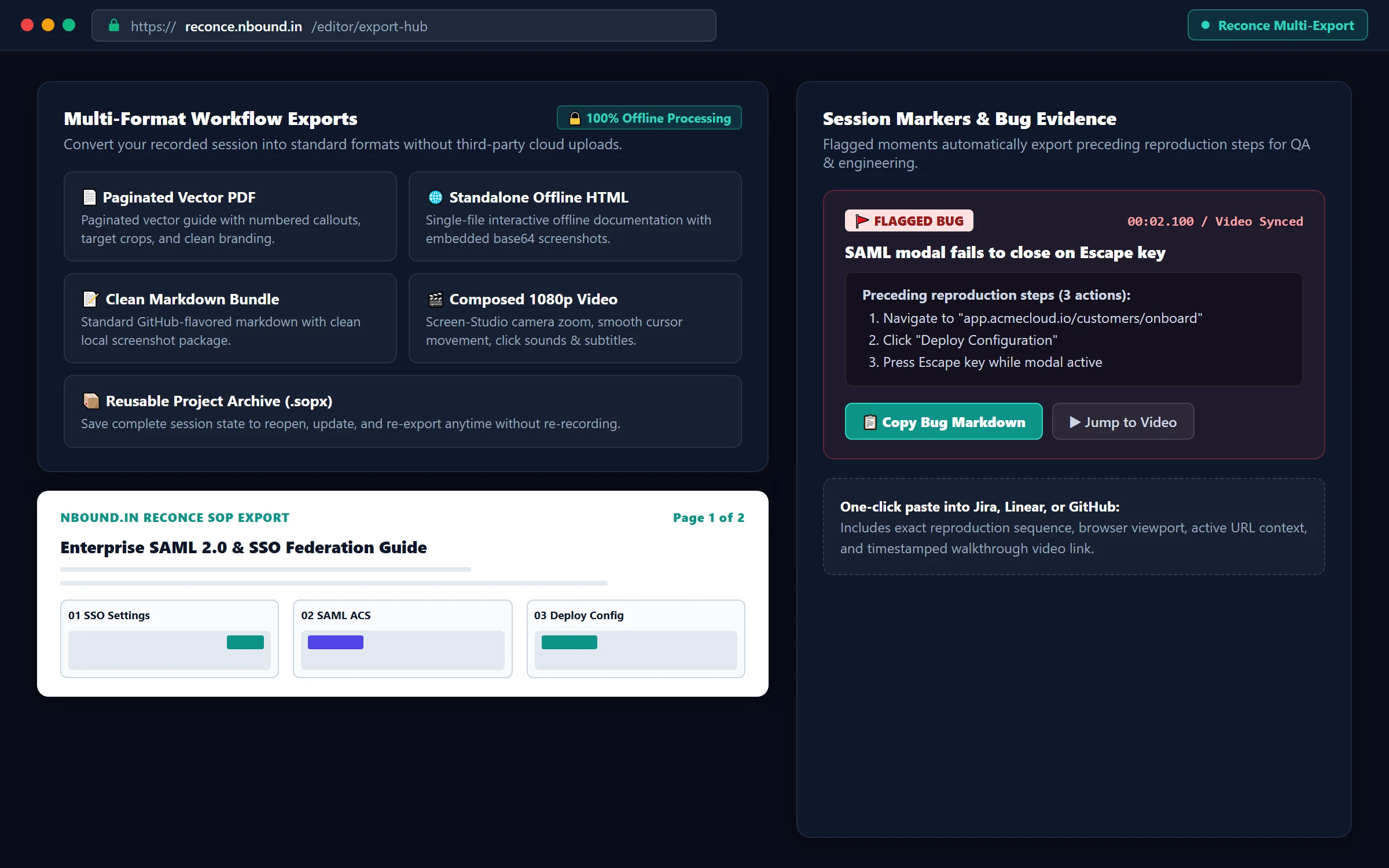
Generate clean paginated PDF documents, standalone HTML, Markdown for Notion/wikis, and 1080p demo videos instantly.

Step 4 Export formats

Who uses Reconce repeatedly.

Anyone explaining complex browser workflows to customers, colleagues, or new hires.

QA & Engineering

Bug reproductions & evidence

Turn reproduction flows into visual evidence with exact DOM steps, URL context, and timestamped video evidence for Jira or Linear.

Example output: 1-click Markdown bug ticket with reproduction steps and synchronized video timestamp.
Customer Support

Ticket resolution guides

Resolve a customer issue in your browser once and instantly deliver a clear, annotated step-by-step PDF or video guide.

Example output: Branded 3-step solution PDF attached directly to Zendesk, Intercom, or email.
Customer Onboarding

Client setup instructions

Turn complex configuration workflows into polished, client-facing documentation that eliminates repetitive onboarding calls.

Example output: Standalone offline HTML guide with embedded screenshots for enterprise client IT teams.
Operations & SOPs

Internal browser procedures

Document financial reconciliation, permissions management, and administrative tasks without spending hours writing documentation.

Example output: Standardized Markdown SOP pushed directly into internal Notion or Confluence wikis.
Client Training

Implementation walkthroughs

Deliver both a paginated reference manual and a 1080p walkthrough video from a single walkthrough recording pass.

Example output: Full 1080p demo video with click sounds and captions plus matching training PDF.
Product Managers

Feature walkthroughs & release notes

Show sales, marketing, and leadership how new capabilities work right from staging environments without video editing software.

Example output: Bite-sized feature demo video with smoothed camera zoom and clean subtitles.

What is available today, and what we are building next.

We only advertise features that genuinely exist and work in our production extension.

Available in Reconce Today Verified Current Release
Browser workflow recording
Semantic DOM label detection
Automatic step screenshots
Vector target highlights & pins
Screenshot crop & annotation
Manual blur & solid redaction
Composed video studio
Screen-Studio camera zoom
Mechanical click sounds
Video speed control (0.5×–2×)
Paginated vector PDF export
Standalone offline HTML export
Markdown package export
Reusable .sopx project backup
100% local-first storage
Google & Email OTP account sync
In Development Coming Soon
Smarter action coalescing Groups sequential typing and navigation keystrokes into single unified steps automatically.
Multi-tab workflow continuation Smoother session stitching when a recorded workflow opens child popup windows or third-party OAuth tabs.
Sidebar & navigation auto-crop Intelligently trims repetitive navigation sidebars to emphasize the active form or content region.
Flagged-moment review workspace Dedicated side-by-side QA view to inspect bookmarked bugs directly against the interaction timeline.
Guide health & stale-step detection Notifies you when an internal web application changes its DOM selectors or button labels.

Start free. Try Pro free for 3 days.

Start with Free, or try every Reconce Pro feature for 3 days at $0. A payment method is required; cancel before the trial ends to avoid being charged.

FREE

$0

forever

For testing Reconce and creating personal or occasional internal guides.

  • Browser workflow recording
  • Editable generated steps
  • Automatic screenshots
  • Screenshot crop & basic annotation
  • Basic PDF export
  • 720p walkthrough video
  • Reconce branding watermark
Add to Chrome — Free

Clear answers to common questions.

Everything you need to know about privacy, recording local data, supported browsers, and subscription billing.

Does Reconce upload my recordings to cloud servers? +

No. Reconce is designed local-first. All recordings, screenshots, interaction metadata, and video rendering happen entirely inside your browser on your device. Nothing is uploaded to any server unless you intentionally export or share a file. Account and billing data for Pro subscriptions are handled separately through Paddle.

What browsers are supported? +

Reconce runs as a Chrome extension and is fully supported on Google Chrome and all Chromium-based browsers, including Brave, Microsoft Edge, Arc, and Opera.

Can I edit generated steps and screenshots? +

Yes. Reconce provides a full guide editor. You can reword step instructions, reorder or delete steps, crop screenshots, draw arrows and highlight boxes, add numbered step pins, and tune camera zoom points before exporting.

How does redaction work? Can I hide sensitive client data? +

Yes. Reconce includes built-in redaction tools. You can apply blur or solid blackout boxes over passwords, API keys, client email addresses, or financial numbers before exporting. Redactions burn permanently into the final PDF, HTML, Markdown, and video files.

Can one recording create both a guide and a video? +

Yes. That is the core architecture of Reconce. A single recording session captures both DOM interaction steps with screenshots and the continuous video stream. You get both the written SOP manual and the walkthrough video without doing the task twice.

What happens if I cancel my Pro subscription? +

Your Pro entitlement remains active through the end of your prepaid billing period. Your locally stored projects and .sopx backups remain permanently on your machine. If your subscription ends, you continue to have full access to Free plan recording and basic exports.

Is this for screen recording or process documentation? +

It eliminates the tradeoff between them. Screen recorders produce long, unskimmable video files. Document editors require you to take screenshots manually and write every step. Reconce captures the workflow once and gives you both: a readable, searchable step-by-step guide and a focused, studio-quality walkthrough video.

Who is Reconce best suited for? +

Reconce is built for QA engineers capturing bug reproductions, customer support specialists creating help articles, customer success managers building onboarding guides, operations teams documenting internal procedures, and implementation specialists training clients.

Document the next workflow while you do it.

No manual screenshotting. No typing steps twice. Install the extension and start recording in seconds.